Capacitive Touch Screen Technology Explained: Working Principle, Evolution, Applications, and Maintenance
Capacitive touch screen technology has become one of the most important human-machine interface technologies in modern electronic devices. From smartphones and tablets to industrial HMIs, medical terminals, outdoor kiosks, vehicle-mounted displays, and smart control panels, capacitive touch screens enable fast, intuitive, and durable user interaction.
Compared with traditional resistive touch screens, capacitive touch screens provide a lighter touch feel, better optical clarity, true multi-touch capability, stronger surface durability, and a more modern user experience. However, capacitive touch is not just a “glass screen that senses fingers.” It is a complete sensing system that includes a conductive sensor pattern, cover glass, touch controller IC, firmware algorithms, grounding design, and host interface.
This article explains why capacitive touch screens became mainstream, how they work, how the technology has evolved, and how to use and maintain them properly in real applications.
Table of Contents
Why Capacitive Touch Screens Were Developed
How Capacitive Touch Screens Work
Surface Capacitive vs Projected Capacitive Touch
Self-Capacitive vs Mutual-Capacitive Sensing
Technology Evolution: From Early Capacitive Screens to Modern PCAP
Advantages of Modern Capacitive Touch Screens
Remaining Engineering Challenges
Common Application Scenarios
Use and Maintenance Recommendations
Final Thoughts
CTA
1. Why Capacitive Touch Screens Were Developed
1.1 Limitations of Resistive Touch Screens
Before capacitive touch screens became widely adopted, resistive touch screens were common in industrial panels, POS systems, handheld devices, and early touch electronics.
A resistive touch screen typically uses two conductive layers separated by tiny spacer dots. When the user presses the surface, the top conductive layer contacts the bottom layer, and the controller calculates the touch position based on voltage change.
Resistive touch technology has several advantages. It can be operated with fingers, gloves, styluses, or almost any object. It is also relatively simple and cost-effective.
However, it has clear limitations for modern interactive devices:
It usually requires physical pressure to trigger a touch.
Standard designs mainly support single-touch input.
The flexible top film can be scratched or worn.
Multiple film layers can reduce optical clarity.
Long-term mechanical pressing may affect durability.
Some designs require calibration after extended use.
Gesture-based interaction is limited.
As user interfaces became more visual, gesture-driven, and display-integrated, these limitations became increasingly obvious.
1.2 Rising Demand for Better Touch Experience
The growth of smartphones, tablets, smart terminals, and modern industrial displays created new expectations for touch interaction.
Users began to expect:
Light-touch operation
Smooth sliding and scrolling
Multi-touch gestures
Higher optical transparency
Stronger surface durability
Better visual integration with LCD or OLED displays
A sealed and easy-to-clean front surface
More modern product design
Capacitive touch technology met these requirements better than traditional resistive touch in many applications.
1.3 Why Capacitive Touch Became Mainstream
The first-generation iPhone in 2007 played a major role in accelerating mainstream adoption of projected capacitive touch technology in consumer electronics. Multi-touch gestures, smooth finger tracking, and a glass-front interface changed user expectations across the entire electronics industry.
Since then, capacitive touch technology has expanded far beyond smartphones. It is now widely used in:
Industrial HMI systems
Touch monitors
Medical devices
Outdoor self-service kiosks
EV charging terminals
Vehicle-mounted displays
Smart home panels
Commercial terminals
Public information displays
The reason is not only better touch feel. Modern capacitive touch screens also support sealed front glass, optical bonding, anti-glare coating, glove operation, water rejection tuning, and better integration with industrial design.
2. How Capacitive Touch Screens Work
2.1 Core Physical Principle
A capacitive touch screen works by detecting changes in capacitance.
In simple terms, a capacitive touch sensor creates an electric field across a transparent conductive electrode pattern. When a finger approaches or touches the cover glass, the human body interacts with this electric field and changes the local capacitance. The touch controller IC detects this small change and calculates the touch position.
Unlike resistive touch screens, capacitive touch screens do not need the top layer to physically bend and contact another layer. This is why capacitive screens can respond to light touch and support durable glass-front structures.
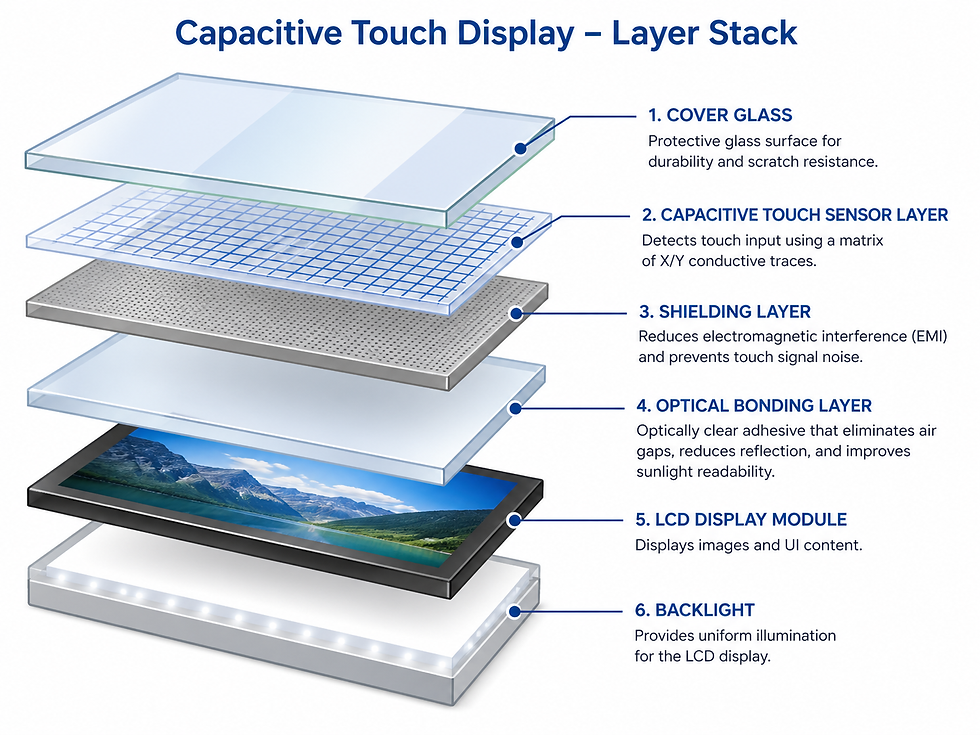
2.2 Typical Capacitive Touch Screen Structure
A typical capacitive touch display may include the following layers:
Layer | Material or Component | Function |
Cover glass | Chemically strengthened glass | Protects the surface and provides touch interface |
Surface treatment | AG, AR, AF, or antibacterial coating | Improves readability, cleanliness, or hygiene |
Touch sensor layer | ITO, metal mesh, silver nanowire, or other conductive material | Forms the sensing electrode pattern |
Optical bonding layer | OCA or LOCA, depending on design | Reduces air gap, reflection, and improves optical performance |
Display module | LCD or OLED | Displays the image |
Touch controller IC | Dedicated controller chip | Scans sensor signals and calculates touch coordinates |
FPC and interface | FPC, USB, I²C, SPI, UART, or RS232 | Connects touch system to host device |
ITO, or indium tin oxide, has traditionally been a common transparent conductive material because it offers good optical transmission and electrical conductivity. For larger or flexible touch displays, other conductive materials such as metal mesh and silver nanowire may also be used.
2.3 Working Process
The working process of a capacitive touch screen can be divided into several steps.
1. Electric Field Generation
The touch sensor electrode pattern creates a stable electric field across the touch surface.
2. Finger Coupling
When a finger touches or approaches the glass, it creates capacitive coupling with the sensor electrode. This changes the local capacitance value.
3. Signal Detection
The touch controller IC scans the electrode matrix and detects very small capacitance changes. These changes may be extremely small, so the controller needs low-noise sensing circuits and signal processing algorithms.
4. Noise Filtering
The controller filters unwanted signals from the display module, power supply, electromagnetic interference, water droplets, or environmental changes.
5. Coordinate Calculation
The controller calculates the touch coordinates and identifies whether the input is a single touch, multi-touch, gesture, or possible false touch.
6. Data Reporting
The processed touch data is sent to the host system through an interface such as USB, I²C, SPI, UART, or RS232.
3. Surface Capacitive vs Projected Capacitive Touch
Capacitive touch technology includes different types. The two most common categories are surface capacitive touch and projected capacitive touch.
3.1 Surface Capacitive Touch
Surface capacitive touch uses a uniform conductive coating on the glass surface. Electrodes are typically placed around the edges or corners of the screen. When a finger touches the screen, the controller measures current or capacitance changes to estimate the touch position.
Advantages
Relatively simple structure
Lower cost compared with advanced PCAP designs
Suitable for some legacy or simple touch applications
Limitations
Usually supports only single-touch input
Lower positional accuracy compared with modern PCAP
Limited gesture capability
Less suitable for modern multi-touch interfaces
Surface capacitive touch was more common in earlier touch systems. Today, most modern capacitive touch screens use projected capacitive technology.
3.2 Projected Capacitive Touch, or PCAP
Projected capacitive touch, commonly called PCAP, uses patterned electrodes arranged in rows and columns. These electrodes create a sensing matrix across the touch surface.
PCAP is the mainstream solution for modern capacitive touch screens because it supports:
True multi-touch
High accuracy
Light-touch operation
Glass-front design
Gesture control
Better integration with LCD and OLED displays
Industrial customization
Glove and water-touch tuning with proper controller design
PCAP technology is widely used in smartphones, tablets, industrial HMIs, medical devices, self-service kiosks, outdoor terminals, and vehicle displays.
4. Self-Capacitive vs Mutual-Capacitive Sensing
Projected capacitive touch can operate in different sensing modes. The two important types are self-capacitive sensing and mutual-capacitive sensing.
4.1 Self-Capacitive Sensing
Self-capacitive sensing measures the capacitance between each electrode and ground. When a finger touches the screen, the capacitance of the nearby electrode changes.
Advantages
High sensitivity
Relatively fast response
Useful for simple touch detection
Can work well for single-touch or button-type designs
Limitations
Multi-touch recognition is limited
Ghost points may occur in some multi-touch situations
Less suitable for complex gesture interfaces
Self-capacitive sensing can still be useful in simple touch panels, touch buttons, and certain industrial control designs.
4.2 Mutual-Capacitive Sensing
Mutual-capacitive sensing measures the capacitance between crossing transmit and receive electrodes. When a finger touches the screen, it changes the coupling capacitance at specific intersection points.
Advantages
Supports true multi-touch
Better coordinate accuracy
More suitable for gestures
Reduces ghost touch problems
Widely used in modern PCAP touch screens
Because it can identify multiple touch points independently, mutual-capacitive sensing has become the mainstream technology for modern multi-touch applications.

5. Technology Evolution: From Early Capacitive Screens to Modern PCAP
5.1 Early Capacitive Touch Screens
Early capacitive touch screens offered several major improvements over resistive touch technology:
Light-touch operation
Faster perceived response
Better transparency
Hard glass surface
No pressure-based mechanical wear
No regular user calibration
More modern appearance
However, early capacitive touch screens also had limitations:
Poor performance with ordinary gloves
Sensitivity to water droplets or conductive liquids
Higher cost than resistive touch
Greater sensitivity to EMI if not properly designed
More complex controller and sensor requirements
Higher repair cost if the glass structure was damaged
These limitations were especially important in industrial and outdoor applications.
5.2 Modern Improvements in Capacitive Touch Technology
Over time, touch controller ICs, sensor materials, algorithms, and manufacturing processes improved significantly.
Earlier Challenge | Modern Improvement | Engineering Benefit |
Glove operation was difficult | High-sensitivity controller tuning and optimized sensor design | Supports thin medical gloves and selected industrial gloves |
Water caused false touches | Water rejection algorithms and surface coating options | Better outdoor and wet-environment stability |
EMI caused drift or false touch | Differential sensing, shielding, grounding, and firmware filtering | Improved industrial reliability |
Higher cost | Scale production and process optimization | More practical for industrial and commercial devices |
Glass breakage risk | Strengthened cover glass and better mechanical design | Improved surface durability |
Display reflection | Optical bonding, AG, and AR treatment | Better outdoor readability |
Modern industrial PCAP is no longer just consumer-grade capacitive touch. It can be engineered for specific environments and applications.
5.3 New Features of Modern Capacitive Touch Screens
Modern capacitive touch screens can support many advanced features:
Multi-touch operation
High touch report rate
Glove operation
Water rejection
Palm rejection
Thick cover glass support
AG anti-glare treatment
AR anti-reflective coating
AF easy-clean coating
Antibacterial cover glass
Optical bonding
Low-power scanning modes
Large-format touch displays
Custom FPC and interface design
Industrial EMC optimization
In large-size applications, metal mesh and other low-resistance conductive materials can support bigger touch areas, such as interactive displays, industrial touch monitors, and education whiteboards.
6. Advantages of Modern Capacitive Touch Screens
6.1 Better User Experience
Capacitive touch screens respond to light touch, making the interface feel faster and more natural. Users can scroll, swipe, zoom, drag, and operate complex interfaces more smoothly.
This is important not only for consumer electronics but also for modern industrial HMIs, medical devices, and public-use terminals.
6.2 True Multi-Touch Capability
Modern mutual-capacitive PCAP technology can detect multiple touch points at the same time. This enables advanced gestures and multi-user interaction.
Typical use cases include:
Zooming into medical images
Moving and scaling industrial dashboards
Operating kiosk interfaces
Multi-touch control panels
Smart retail terminals
Interactive education displays
6.3 Better Optical Performance
Capacitive touch screens usually use a glass-front structure. They can be combined with optical bonding to reduce internal reflection and improve contrast.
For outdoor or high-ambient-light applications, capacitive touch displays can also include:
High-brightness LCD modules
AG anti-glare glass
AR anti-reflective coating
AF anti-fingerprint coating
UV-resistant materials
This makes capacitive touch suitable for outdoor kiosks, EV charging stations, transportation terminals, and industrial field equipment.
6.4 Stronger Surface Durability
Compared with a flexible PET surface, chemically strengthened glass provides better resistance to scratches and daily wear.
For public-use and industrial devices, this means better long-term appearance and lower maintenance pressure.
6.5 Sealed and Easy-to-Clean Front Surface
A capacitive touch display can be designed with a continuous glass front surface. This is valuable for:
Medical devices
Laboratory equipment
Food processing panels
Outdoor terminals
Industrial HMIs
Public-use kiosks
A sealed front surface reduces dust accumulation, improves cleanability, and supports IP-rated mechanical designs when properly integrated with the enclosure.
7. Remaining Engineering Challenges
Although capacitive touch technology has improved significantly, it still requires proper engineering in demanding environments.
7.1 Glove Operation
Capacitive touch relies on electric field sensing. Thick gloves can weaken the coupling between the finger and sensor.
Modern industrial PCAP can support glove operation with the right controller, sensor pattern, cover glass thickness, and firmware tuning. In project-specific designs, glove performance should always be tested with the actual gloves used by operators.
7.2 Water and Conductive Liquid
Water droplets, sweat, cleaning liquid, or conductive contamination can affect the electric field on the touch surface. Without proper tuning, this may cause false touches or unstable coordinates.
Industrial and outdoor PCAP solutions often require:
Water rejection algorithms
Proper grounding
Suitable surface coating
Sealed front design
Field validation under real wet conditions
7.3 EMI Interference
Capacitive sensing can be affected by electromagnetic noise from motors, inverters, power supplies, relays, high-voltage cables, or wireless modules.
For industrial applications, EMI stability depends on:
Touch controller selection
Sensor pattern design
FPC routing
Shielding layer
Grounding path
Mechanical enclosure
Firmware filtering
This is why industrial PCAP should be designed as a complete system, not just selected as a standard touch panel.
7.4 Extreme Temperature
Low temperatures may affect the LCD module, cover glass surface behavior, controller response, and system boot conditions. High temperatures may accelerate material aging and affect optical bonding, coatings, or controller stability.
For outdoor or industrial applications, wide-temperature components and reliability validation are recommended.
7.5 Glass Breakage Risk
Capacitive touch screens usually use glass as the front surface. Although chemically strengthened glass improves durability, glass can still break under strong impact, edge stress, or improper mechanical design.
For rugged applications, engineers should evaluate:
Cover glass thickness
Edge strength
Mounting stress
Impact resistance
Vandal resistance
Housing protection
Surface treatment
Safety glass options
8. Common Application Scenarios
Capacitive touch screens are used across a wide range of industries.
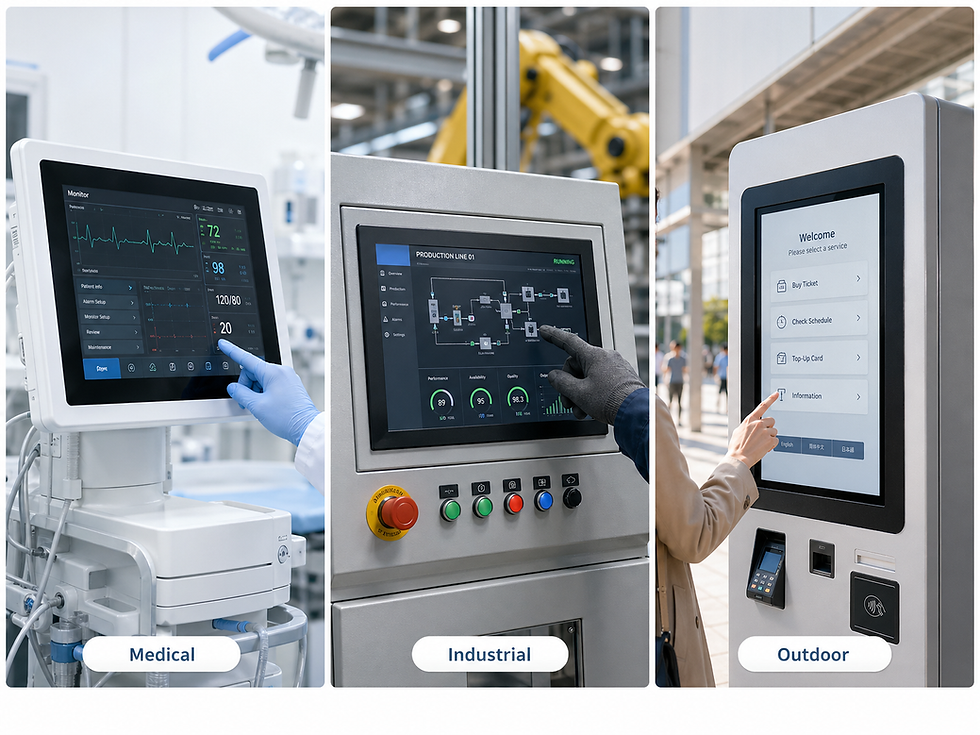
8.1 Industrial HMI and Automation Equipment
Industrial HMIs require stable touch input, EMI resistance, long service life, and compatibility with control systems. PCAP is increasingly used in modern automation panels because it supports sealed glass fronts and a more intuitive interface.
8.2 Medical Devices
Medical touch displays require easy cleaning, glove operation, chemical resistance, and stable performance after repeated disinfection. Capacitive touch screens can be combined with antibacterial glass, AF coating, and optical bonding for medical environments.
8.3 Outdoor Kiosks and Public Terminals
Outdoor self-service kiosks, EV chargers, ticketing machines, and parking terminals require sunlight readability, water resistance, vandal resistance, and stable touch performance in changing weather conditions.
8.4 Vehicle-Mounted Displays
Vehicle terminals require stable operation under vibration, temperature variation, EMI, and long-term use. Capacitive touch can be customized with rugged cover glass and industrial controller tuning.
8.5 Commercial and Smart Equipment
POS systems, smart lockers, access control panels, retail terminals, and interactive displays use capacitive touch for smooth operation and modern interface design.
9. Use and Maintenance Recommendations
Proper use and maintenance help keep capacitive touch displays stable and reliable.
9.1 Cleaning and Surface Care
Recommended practices include:
Use a soft microfiber cloth for daily cleaning.
Use screen-safe cleaning agents approved for the device surface.
Avoid abrasive cloth, hard tools, or sharp objects.
Do not spray excessive liquid directly into the bezel or edge area.
For medical or industrial cleaning, verify chemical compatibility with the coating and cover glass.
For screens with AF, AG, AR, or antibacterial coating, aggressive solvents may damage the surface treatment. Cleaning procedures should follow the coating specification.
9.2 Avoid Excessive Force
Capacitive touch screens do not require hard pressing. A light touch is usually enough.
Excessive force can cause:
Glass stress
Touch sensor damage
Optical bonding stress
LCD pressure marks
Mechanical deformation
For industrial operators, training users to avoid unnecessary pressure can help extend product life.
9.3 ESD and Grounding Protection
Electrostatic discharge can affect touch controller stability or damage electronic components in severe cases. For industrial equipment, the system should include proper grounding, shielding, and ESD protection.
Good practices include:
Use proper grounding design in equipment integration.
Avoid floating metal structures near the touch sensor.
Ensure the FPC and controller board are properly shielded.
Validate touch performance under ESD and EMI conditions when required.
9.4 Environmental Control
Capacitive touch screens should be used within the specified operating temperature and humidity range of the final device.
For harsh environments, consider:
Wide-temperature LCD modules
Rugged cover glass
Optical bonding
Waterproof front sealing
Anti-glare surface treatment
Condensation prevention
Thermal management
9.5 Protective Accessories
Protective films, cover lenses, or enclosures should be selected carefully.
A film that is too thick or poorly matched may reduce sensitivity. A metal enclosure that is not properly grounded may increase interference. A cover glass design that is too thick may require special controller tuning.
Always evaluate accessories as part of the complete touch system.
9.6 Firmware and Calibration
Modern capacitive touch screens typically use controller firmware for baseline tracking, noise filtering, water rejection, and glove mode.
For industrial devices, firmware parameters should be optimized during product development, not only after field issues occur.
When touch drift, false touch, or poor sensitivity appears, engineers should check:
Surface contamination
Grounding condition
Power noise
Firmware settings
Cable routing
Water or liquid on the surface
Cover glass or film changes
Controller compatibility
10. Final Thoughts
Capacitive touch screen technology transformed human-machine interaction by enabling light-touch operation, multi-touch gestures, better optical clarity, stronger surface durability, and modern glass-front product design.
Its evolution from early surface capacitive touch to modern projected capacitive technology has made it suitable not only for smartphones and tablets, but also for industrial HMIs, medical devices, outdoor terminals, vehicle-mounted displays, and smart commercial equipment.
However, capacitive touch performance depends on complete system design. The controller IC, sensor structure, cover glass, grounding, shielding, coating, firmware, display module, and mechanical enclosure all affect final performance.
For demanding applications, choosing a capacitive touch screen is not just a component decision. It is an engineering decision that must consider the actual operating environment, user behavior, cleaning method, EMI conditions, temperature range, and long-term reliability requirements.
touchpro provides customized capacitive touch screen solutions for industrial, medical, outdoor, vehicle-mounted, and commercial equipment. From PCAP sensor design and controller selection to glove tuning, water rejection, EMI optimization, optical bonding, and surface treatment, touchpro helps customers build reliable touch interfaces for real-world applications.


