What is a touch screen kiosk?
- 1 day ago
- 8 min read
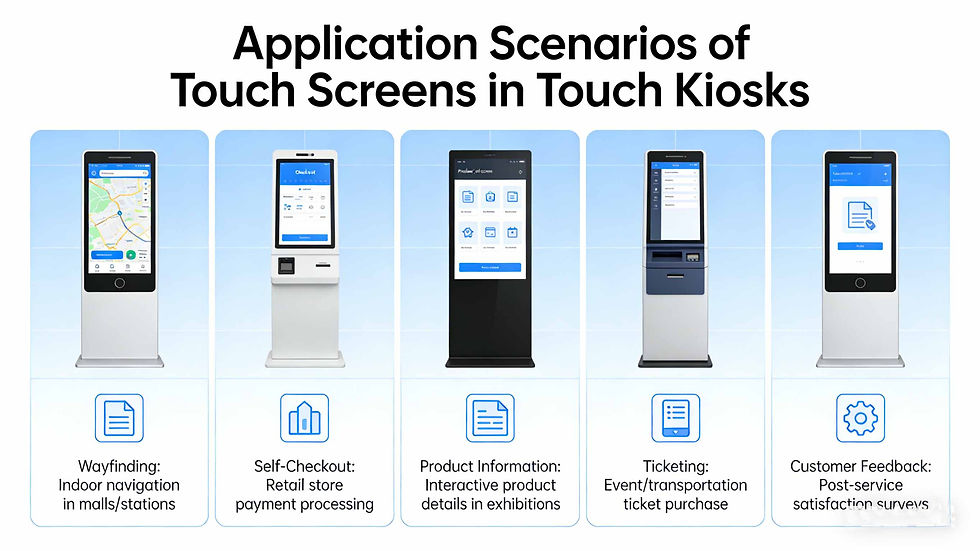
In an era of digital transformation, touch screen kiosks have become ubiquitous in public spaces, retail stores, healthcare facilities, and beyond. These self-service devices blend intuitive touch technology with functional software to deliver seamless, efficient interactions—empowering users to access information, complete transactions, or perform tasks without the need for human assistance. But what exactly is a touch screen kiosk, how does it work, and why has it become such an essential tool for businesses and organizations worldwide? This comprehensive guide breaks down everything you need to know about touch screen kiosks, from their core components to their diverse applications and future trends.
Defining a Touch Screen Kiosk
A touch screen kiosk is a freestanding or wall-mounted self-service device that combines a touch-sensitive display (the "touch screen") with a built-in computer, software, and often additional hardware (such as card readers, printers, or scanners) to enable user-driven interactions. Unlike traditional computers or mobile devices, touch screen kiosks are designed for public or semi-public use, with a focus on simplicity, durability, and accessibility.
They eliminate the need for a keyboard or mouse, allowing users to interact directly with the screen using their fingers or a stylus—making them intuitive even for those with limited technical experience.
At its core, a touch screen kiosk is built to solve a key problem: bridging the gap between digital services and physical spaces. Whether it’s a customer checking out at a retail store, a traveler printing a boarding pass at an airport, or a patient checking in at a hospital, touch screen kiosks streamline processes, reduce wait times, and enhance the overall user experience.
Core Components of a Touch Screen Kiosk
While touch screen kiosks vary in size, design, and functionality, they all share a set of essential components that work together to deliver a seamless self-service experience. Here’s a breakdown of the key parts:
1. Touch Screen Display
The touch screen is the most visible and critical component of the kiosk. It serves as both the user interface and the input device, allowing users to navigate menus, enter information, and select options with a simple tap or swipe. There are several types of touch screen technologies used in kiosks, each with its own advantages:
Capacitive Touch Screens: The most common type in modern kiosks, capacitive screens use electrical signals from the user’s finger to detect touch. They are highly responsive, support multi-touch gestures (like pinching or swiping), and work well in high-traffic environments. They are also resistant to dust and dirt, making them ideal for public use.
Resistive Touch Screens: These screens use pressure to detect touch, meaning they can be used with fingers, styluses, or even gloves. While they are less expensive than capacitive screens, they are less responsive and do not support multi-touch. They are often used in industrial or outdoor kiosks where durability is a top priority.
Infrared Touch Screens: These screens use infrared sensors around the display to detect touch. They are highly durable, work with any object (fingers, styluses, gloves), and are resistant to scratches. They are commonly used in outdoor kiosks or environments where the screen may be exposed to harsh conditions.
2. Built-in Computer/Processor
A touch screen kiosk requires a built-in computer or processor to run its software and process user inputs. This computer is typically compact and designed for continuous use (24/7 in some cases), with sufficient processing power to handle the kiosk’s intended functions—whether that’s running a point-of-sale (POS) system, displaying interactive maps, or processing payment information. Many modern kiosks use industrial-grade computers to ensure reliability and longevity, even in high-traffic or harsh environments.
3. Software
The software is the "brain" of the touch screen kiosk, dictating its functionality and user experience. Kiosk software is typically custom-designed for a specific purpose, but there are also off-the-shelf solutions available for common use cases (such as self-checkout or information display). Key features of kiosk software include:
Intuitive user interface (UI) designed for quick, easy navigation
Security features to protect user data (e.g., encryption for payment information)
Remote management capabilities (allowing businesses to update content, monitor performance, or troubleshoot issues from a central location)
Integration with other systems (e.g., POS systems, customer relationship management (CRM) software, or inventory management tools)
4. Additional Hardware (Optional)
Depending on the kiosk’s intended use, it may include additional hardware to enhance functionality:
Card Readers: For processing credit/debit card payments or accessing secure information (e.g., employee ID cards).
Printers: For printing receipts, tickets, boarding passes, or coupons.
Scanners: For scanning barcodes, QR codes, or IDs (e.g., passport scanners at airports).
Cameras: For facial recognition (e.g., for secure access) or video chat (e.g., virtual customer service).
Speakers and Microphones: For audio instructions, voice commands, or video calls.
5. Enclosure
The enclosure is the physical casing that houses all the kiosk’s components. It is designed to be durable, secure, and user-friendly—protecting the internal hardware from damage, theft, or tampering. Enclosures are often made from materials like steel, aluminum, or high-grade plastic, and they may include features like anti-glare screens, waterproofing (for outdoor kiosks), or lockable doors for maintenance.
How Does a Touch Screen Kiosk Work?
The operation of a touch screen kiosk is straightforward, relying on a simple interaction between the user, the touch screen, and the built-in software. Here’s a step-by-step breakdown of how it works:
Power On: The kiosk is powered on, and the built-in computer boots up the kiosk software. The touch screen displays a welcome message or main menu, guiding the user to begin their interaction.
User Interaction: The user touches the screen to select an option (e.g., "Check Out," "View Map," "Print Ticket"). The touch screen detects the touch (using capacitive, resistive, or infrared technology) and sends a signal to the computer.
Software Processing: The computer processes the user’s input and executes the corresponding action. For example, if the user selects "Check Out," the software will guide them through entering their items, selecting a payment method, and processing the transaction.
Feedback and Output: The kiosk provides feedback to the user (e.g., a confirmation message, a progress bar) and delivers the desired output (e.g., a printed receipt, a digital boarding pass, or updated information on the screen).
Reset (Optional): After the user completes their interaction, the kiosk may automatically reset to the main menu, ready for the next user. This ensures privacy (e.g., clearing any personal information entered) and maintains efficiency in high-traffic areas.
Common Applications of Touch Screen Kiosks
Touch screen kiosks are versatile and can be customized for almost any industry or use case. Here are some of the most common applications:
1. Retail
In retail stores, touch screen kiosks are used to enhance the customer experience and streamline operations. Common uses include:
Self-checkout kiosks: Allow customers to scan and pay for their items without waiting in line, reducing checkout times and freeing up staff to assist with other tasks.
Product information kiosks: Provide details about products (e.g., specifications, pricing, availability) and allow customers to search for items or check inventory.
Loyalty program kiosks: Let customers sign up for loyalty programs, check their points, or redeem rewards.
2. Healthcare
In hospitals, clinics, and medical facilities, touch screen kiosks improve efficiency and patient experience:
Patient check-in kiosks: Allow patients to check in for appointments, update their personal information, and print visit summaries—reducing wait times and administrative work for staff.
Wayfinding kiosks: Help patients and visitors navigate large medical facilities by displaying interactive maps and directions to departments, doctors’ offices, or restrooms.
Prescription pickup kiosks: Allow patients to pick up their medications quickly and securely, with options to verify their identity and receive dosage instructions.
3. Transportation
Airports, train stations, and bus terminals use touch screen kiosks to streamline travel processes:
Boarding pass kiosks: Allow travelers to print their boarding passes, check in for flights, or select seats—reducing lines at airline counters.
Ticketing kiosks: Let users purchase tickets for trains, buses, or attractions, with options to pay by card or mobile payment.
Information kiosks: Display real-time flight/train schedules, gate changes, and travel information (e.g., weather, local attractions).
4. Hospitality
Hotels, resorts, and restaurants use touch screen kiosks to enhance guest experience:
Hotel check-in/out kiosks: Allow guests to check in to their rooms, get room keys, and check out—reducing wait times at the front desk.
Menu kiosks: Let restaurant customers browse menus, place orders, and pay—speeding up service and reducing errors.
Concierge kiosks: Provide guests with information about local attractions, events, and services (e.g., taxi bookings, restaurant reservations).
5. Government and Public Services
Government offices and public spaces use touch screen kiosks to make services more accessible:
DMV kiosks: Allow users to renew driver’s licenses, pay fines, or update their vehicle registration—reducing lines at DMV offices.
Library kiosks: Let patrons check out books, return items, or search the library catalog.
Public information kiosks: Display information about local government services, events, or emergency alerts.
The Benefits of Touch Screen Kiosks for Businesses
For businesses and organizations, touch screen kiosks offer a wide range of benefits that make them a valuable investment. Here are some of the key advantages:
1. Improved Efficiency
Touch screen kiosks automate repetitive tasks (e.g., check-in, checkout, information lookup), reducing wait times for users and freeing up staff to focus on more complex tasks. This leads to faster service, higher productivity, and a better overall experience for both users and staff.
2. Cost Savings
By reducing the need for human staff to handle routine tasks, touch screen kiosks can lower labor costs over time. They also require minimal maintenance (especially industrial-grade models) and can operate 24/7, generating revenue or providing services even when staff are not available.
3. Enhanced User Experience
Touch screen kiosks are intuitive and easy to use, making them accessible to users of all ages and technical abilities. They provide instant access to information or services, allowing users to complete tasks at their own pace—without the need to wait for assistance.
4. Data Collection and Insights
Many touch screen kiosks are equipped with software that collects data on user interactions (e.g., which options are selected most frequently, how long users spend on each task). This data can provide valuable insights into user behavior, helping businesses optimize their services, improve their kiosk software, and make more informed decisions.
5. 24/7 Availability
Unlike human staff, touch screen kiosks can operate 24 hours a day, 7 days a week—providing services to users at any time, even outside of normal business hours. This is especially valuable for businesses in high-traffic areas (e.g., airports, malls) or those that serve users with varying schedules.
Future Trends in Touch Screen Kiosks
As technology continues to evolve, touch screen kiosks are becoming more advanced, with new features and capabilities that enhance their functionality and user experience. Here are some of the key trends to watch in 2026 and beyond:
1. AI and Machine Learning Integration
AI-powered kiosks are becoming more common, with features like chatbots, facial recognition, and personalized recommendations. For example, a retail kiosk might use AI to suggest products based on a user’s past purchases, while a healthcare kiosk could use facial recognition to quickly identify patients and pull up their medical records.
2. Contactless and Mobile Integration
In response to growing demand for contactless interactions, many kiosks now support mobile integration—allowing users to connect their smartphones to the kiosk via QR codes, Bluetooth, or NFC. This enables users to complete transactions, access information, or save receipts directly to their phones, reducing the need to touch the kiosk screen.
3. Outdoor and Rugged Kiosks
With advances in touch screen technology and enclosure design, outdoor kiosks are becoming more durable and reliable. These kiosks are built to withstand harsh weather conditions (e.g., rain, snow, extreme temperatures) and are used in parks, parking lots, and other outdoor spaces to provide information or services.
4. Accessibility Features
Kiosk manufacturers are increasingly focusing on accessibility, with features like screen readers, adjustable font sizes, and tactile feedback to make kiosks usable for users with disabilities. This ensures that touch screen kiosks are inclusive and accessible to everyone.
Conclusion
A touch screen kiosk is more than just a self-service device—it’s a powerful tool that bridges the gap between digital technology and physical spaces, enhancing efficiency, improving user experience, and helping businesses and organizations meet the evolving needs of their customers and users. From retail and healthcare to transportation and government, touch screen kiosks are transforming the way we interact with services and information, and their popularity is only set to grow as technology advances.
Whether you’re a business owner looking to streamline operations, a government organization aiming to improve public services, or simply a user who interacts with these devices daily, understanding what a touch screen kiosk is and how it works can help you make the most of this innovative technology.


