Industrial vs Consumer Touch Screen Report Rate: Why Higher Is Not Always Better
- Apr 17
- 9 min read
Touch screen report rate is often used as a performance indicator in smartphones, tablets, gaming devices, industrial HMIs, and embedded control systems. In consumer electronics, a higher report rate is usually associated with smoother touch response, faster gestures, and a more premium user experience. In industrial applications, however, the highest possible report rate is not always the best engineering choice.
Industrial touch screens are designed for a different value system. Instead of focusing only on speed and smoothness, they must balance response time, power consumption, electromagnetic interference resistance, environmental stability, glove operation, water tolerance, long service life, and 24/7 reliability.
This article explains the difference between touch screen report rate in consumer and industrial applications, and why industrial touch screen design often requires a more balanced engineering approach.
1. What Is Touch Screen Report Rate?
Touch screen report rate refers to how many times per second a touch screen sends touch coordinate data to the host system. It is usually measured in hertz, or Hz.
For example:
A 60Hz report rate means the system receives up to 60 touch coordinate reports per second.
A 120Hz report rate means the system receives up to 120 touch coordinate reports per second.
A 240Hz report rate means the system receives up to 240 touch coordinate reports per second.
In simple terms, the higher the report rate, the more frequently the system receives updated touch position data. This can make finger movement appear smoother and reduce the perceived delay between the user’s finger and the on-screen response.
However, report rate is only one part of the complete touch performance chain.
2. Report Rate vs Sampling Rate vs Scan Rate vs Display Refresh Rate
These terms are often mixed together, but they do not mean the same thing.
Parameter | Meaning | Relationship to Touch Performance |
Touch sampling rate | How often the controller samples the sensor signal | A higher sampling rate can provide more raw signal data |
Scan rate | How often the controller completes a scan of the touch sensor matrix | Affects how quickly touch changes can be detected |
Report rate | How often touch coordinates are sent to the host system | Directly affects how often the system receives touch data |
Display refresh rate | How often the display updates the image | Affects visual smoothness, but is separate from touch sensing |
End-to-end latency | Total time from physical touch to visible system response | Depends on controller, firmware, OS, display, and application software |
In many systems, the touch controller may sample or scan the sensor more frequently than it reports data to the host. This allows the controller to filter noise, stabilize coordinates, and avoid sending unstable or false touch data.
For the best user experience, the touch report rate, display refresh rate, operating system input pipeline, and application response must be properly matched.
3. Typical Report Rate Differences Between Consumer and Industrial Touch Screens
Consumer and industrial touch screens are optimized for different priorities.
Dimension | Consumer Touch Screens | Industrial Touch Screens |
Typical application | Smartphones, tablets, gaming phones, smart devices | HMI panels, industrial PCs, control terminals, medical equipment, kiosks |
Common report rate range | Often 120Hz to 720Hz or higher in high-end devices | Often 50Hz to 200Hz, depending on system design |
Main design goal | Smooth gestures, gaming response, premium feel | Reliability, EMI resistance, stability, long service life |
Operating environment | Indoor, clean, dry, temperature-controlled | Dust, oil, water, vibration, EMI, wide temperature range |
Touch operation | Finger gestures, multi-touch, stylus input | Gloves, single-point control, wet fingers, industrial tools |
Power priority | Performance and experience first | Low power, thermal stability, continuous operation |
Reliability target | Intermittent daily use | 24/7 operation and long lifecycle support |
System tuning | User experience and UI smoothness | Noise rejection, debounce, grounding, shielding, safety |
A consumer smartphone may advertise a very high touch sampling rate because fast touch tracking improves gaming, scrolling, handwriting, and gesture interaction. An industrial HMI, on the other hand, may use a moderate report rate because most operations involve buttons, menus, machine settings, alarms, and command confirmation rather than high-speed gestures.
4. How Report Rate Affects Touch Trajectory and User Experience
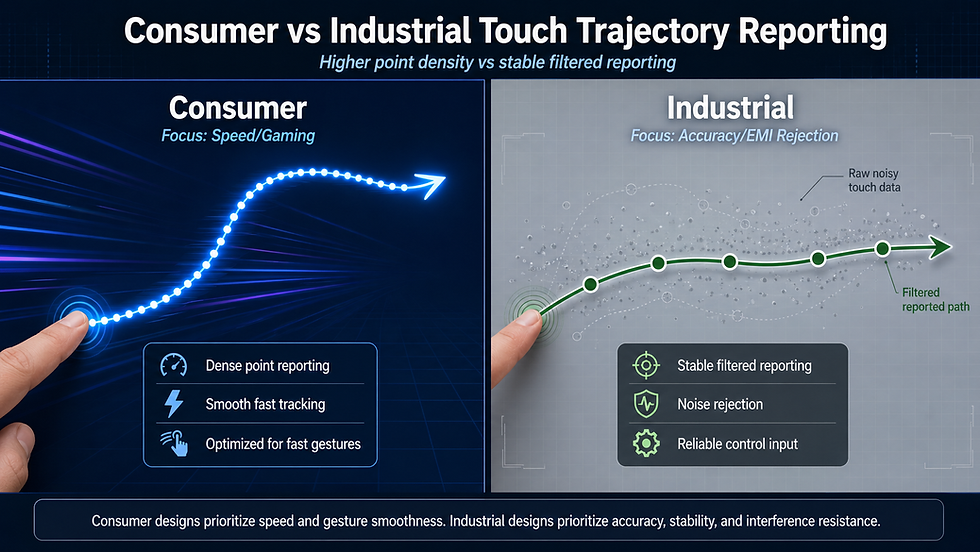
When a user slides a finger across the screen, the touch controller reports a series of coordinate points. A higher report rate can produce a denser set of points, making the movement path smoother.
Report Rate | Typical Touch Feeling | Suitable Applications |
50–60Hz | Basic touch response, suitable for simple button operation | PLC panels, basic HMI, simple control terminals |
100–125Hz | Stable and responsive for most industrial interfaces | Industrial HMI, medical terminals, embedded control panels |
200–240Hz | Smoother tracking and better gesture response | Advanced HMI, interactive terminals, precise control panels |
480Hz and above | Very smooth and responsive touch tracking | Gaming devices, drawing tablets, high-end consumer devices |
For industrial use, extremely high report rates are not always necessary. A machine operator pressing a Start, Stop, Alarm Reset, or Parameter Save button does not require the same touch tracking density as a mobile gamer or digital artist.
What matters more is whether the system can identify the intended touch accurately, reject false touches, and respond consistently under real field conditions.
5. Why Consumer Devices Use Higher Report Rates
Consumer devices compete heavily on user experience. A faster and smoother touch response can make a device feel more premium.
5.1 Smooth Scrolling and Gesture Control
Smartphones and tablets rely heavily on swiping, scrolling, zooming, rotating, and multi-finger gestures. A higher report rate helps the device track finger movement more frequently, which can improve perceived smoothness.
5.2 Gaming Performance
In mobile gaming, even small reductions in touch latency can affect aiming, movement, and reaction speed. This is why many gaming phones use high touch sampling rates as a marketing and performance feature.
5.3 Stylus and Drawing Applications
For writing, sketching, and drawing, the screen must track fine movement accurately. A higher report rate can help reduce line lag and improve pen tracking when combined with a suitable display, controller, and software stack.
5.4 High Refresh Rate Displays
Modern consumer devices often use 90Hz, 120Hz, or higher display refresh rates. A high touch sampling or report rate can better match the high-refresh visual experience.
The trade-off is that higher report rates may require more controller processing, higher bus bandwidth, more power consumption, and more complex signal filtering.
6. Why Industrial Touch Screens Often Use Moderate Report Rates
Industrial touch screen design is not simply about making the touch response faster. It is about making the touch response dependable.
6.1 Reliability Comes Before Extreme Smoothness
Industrial users usually care less about “silky” screen movement and more about whether the touch command is recognized correctly every time. A stable 100Hz report rate with strong noise rejection can be more valuable than a 480Hz system that is sensitive to EMI or moisture.
6.2 Harsh Environments Create More Noise
Industrial equipment may operate near motors, inverters, relays, high-voltage cables, welding equipment, pumps, power supplies, and wireless modules. These sources can introduce electrical noise into the touch system.
A higher scan or report rate may increase the need for more advanced filtering, shielding, grounding, and firmware calibration. Without proper system design, a very sensitive touch screen may become more vulnerable to false touches or unstable coordinates.
6.3 Glove and Wet Touch Requirements
Industrial operators often use gloves. Outdoor kiosks may be exposed to rain. Food processing equipment may face water droplets and cleaning agents. Medical devices may be operated with latex or nitrile gloves.
These conditions require controller tuning that prioritizes stable recognition over extreme touch speed.
6.4 Power and Thermal Constraints
Some industrial devices are battery-powered or installed in sealed enclosures with limited heat dissipation. Higher report rates may increase power consumption and thermal load. For long-term operation, a moderate report rate can help maintain system stability.
6.5 Long Lifecycle and Supply Stability
Industrial products often need long lifecycle support. A touch design must remain stable across production batches, firmware versions, operating temperatures, and field conditions. Overly aggressive performance settings may increase validation complexity.
7. Report Rate and Response Latency Are Not the Same
A common misunderstanding is that report rate equals response speed. In reality, report rate is only one part of latency.
End-to-end touch latency includes:
Sensor scan time
Controller signal processing time
Firmware filtering time
Communication time between controller and host
Operating system input processing
Application software response
Display refresh delay
A screen with a high report rate may still feel slow if the host system, software, or display pipeline is not optimized. Conversely, an industrial touch screen with a moderate report rate can feel responsive if the full system is well designed.
For many industrial HMI applications, a stable response in the range of tens of milliseconds is usually acceptable, provided that the touch command is accurate, repeatable, and not affected by noise or false triggers.
8. PCAP vs Resistive Touch in Industrial Report Rate Design
Both projected capacitive touch and resistive touch are used in industrial environments. The best choice depends on the application.
Technology | Strengths | Limitations | Suitable Use |
Projected capacitive touch | Multi-touch, high sensitivity, smooth operation, modern interface | Requires good EMI design and tuning for water/gloves | Industrial HMI, medical devices, kiosks, outdoor terminals |
Resistive touch | Works with gloves, stylus, and pressure input; simple structure | Lower optical clarity, limited multi-touch, mechanical wear over time | Legacy HMI, simple control panels, harsh environments with pressure input |
In modern industrial systems, PCAP touch is increasingly used because it provides better optical clarity, multi-touch support, sealed front glass, and a more modern user interface. However, it must be engineered properly for EMI, water, glove operation, and grounding.
Resistive touch still has value in certain applications where simple pressure-based input, thick gloves, or legacy system compatibility is required.
9. Engineering Trade-Offs of High Report Rate
A higher report rate can improve touch tracking, but it also introduces engineering trade-offs.
Benefit of Higher Report Rate | Potential Trade-Off |
Smoother finger tracking | Higher power consumption |
Better gesture response | More controller processing load |
Lower perceived input delay | More demanding firmware filtering |
Better stylus or fine movement tracking | Higher EMI sensitivity if not properly designed |
Stronger consumer marketing value | Higher component and validation cost |
For consumer devices, these trade-offs are often acceptable because user experience is the main selling point. For industrial devices, the trade-off must be evaluated more carefully because reliability, safety, and long-term stability are usually more important than extreme smoothness.
10. Recommended Report Rate Ranges by Application
The following ranges are general engineering references. The final value should be selected based on the touch controller, display size, operating system, interface, enclosure, environment, and validation results.
Application | Recommended Report Rate Strategy |
Basic industrial control panel | 50–100Hz is often sufficient for button-based operation |
Standard industrial HMI | 100–125Hz provides a good balance of response and stability |
Advanced PCAP industrial interface | 125–200Hz may improve tracking and gesture performance |
Outdoor kiosk or EV charging terminal | 100–200Hz with water and EMI tuning is usually more important than extreme speed |
Medical touch display | 100–200Hz with glove support, cleanability, and EMC design |
Automotive or vehicle-mounted display | 100–200Hz with vibration, temperature, and EMI validation |
Gaming or high-end consumer device | 240Hz and above can improve perceived responsiveness |
Drawing tablet or stylus device | Higher sampling/report rate may be required for fine tracking |
The key point is that the report rate should match the actual operation mode. A high-speed drawing tablet and an industrial alarm reset panel should not be designed with the same priority.
11. How touchpro Optimizes Touch Performance for Industrial Applications
touchpro designs and manufactures capacitive touch screen solutions for industrial, medical, outdoor, automotive, and commercial equipment. Instead of simply pursuing the highest possible report rate, touchpro focuses on system-level touch performance.
Controller Selection
Different projects require different touch controller ICs. touchpro evaluates screen size, sensor structure, cover glass thickness, interface, operating environment, and touch mode before selecting the controller.
Sensor Pattern Design
The touch sensor pattern affects signal strength, noise immunity, linearity, and touch accuracy. A good design helps improve touch performance without relying only on high report rates.
Firmware Tuning
Firmware tuning is critical for industrial applications. Parameters such as sensitivity, debounce, baseline tracking, water rejection, glove mode, and multi-touch recognition must be adjusted according to the actual product structure.
EMI and Grounding Optimization
For industrial equipment, grounding and shielding are just as important as the controller itself. touchpro can support layout review, FPC design, shielding structure, and grounding strategy to improve anti-interference performance.
Glove and Water Touch Support
For outdoor, medical, food processing, and industrial applications, touch performance must be validated with the actual gloves, water conditions, cover glass, and enclosure design used in the final device.
Interface and Host Compatibility
touchpro supports different host interfaces, including USB, I²C, SPI, UART, RS232, and other project-specific configurations. The final interface selection should match the host system and required data reporting mode.
12. Engineering Selection Guide
When choosing the right report rate for an industrial touch screen project, engineers should ask the following questions:
Is the user operating buttons, menus, gestures, or precise drawing tools?
Is the device used indoors, outdoors, in a vehicle, or near heavy electrical equipment?
Will operators use gloves, wet fingers, or a stylus?
Does the device require 24/7 operation?
What is the acceptable end-to-end response time?
What are the power and thermal constraints?
Is the device exposed to vibration, water, oil, dust, or cleaning chemicals?
What interface does the host system support?
Does the product require EMC, safety, or medical equipment validation?
Is long-term controller supply and firmware support required?
These questions help determine whether the project needs a high report rate, a moderate report rate, or a more conservative but highly stable touch configuration.
13. Final Thoughts
Touch screen report rate is important, but it should not be treated as the only measure of touch screen quality. In consumer electronics, high report rates can improve smoothness, gaming response, handwriting, and gesture interaction. In industrial applications, however, the best report rate is the one that supports stable, accurate, and reliable operation under real field conditions.
A lower or moderate report rate in an industrial touch screen does not necessarily mean weaker technology. In many cases, it is a deliberate engineering decision to improve anti-interference performance, reduce power consumption, enhance reliability, and extend product lifecycle.
For industrial HMIs, outdoor kiosks, medical terminals, vehicle-mounted displays, and embedded control systems, report rate must be balanced with EMI resistance, water and glove touch support, environmental durability, firmware stability, and system-level validation.
The right question is not “How high is the report rate?” but rather:
“What report rate provides the most reliable touch performance for this specific application?”